Deconstructing Coding in the Curriculum

We are all time poor! Are you all nodding in agreement? Many of us spend hours of our own time working back in our class rooms after hours, creating resources at home, marking assessments…and the list goes on. So when approached with something new we need to follow some well known advice ‘work smarter not harder’.

This is how I approached my journey at deconstructing the Digital Technologies curriculum. I looked elsewhere for help, why reinvent the wheel if someone else has already broached the subject? The focus topic being, what skills need to be taught and assessed, and for which age group? What I came across during my search was a kind, experienced educator who was happily sharing her knowledge to the world. Glenys Goffett, on her school’s website copacabana-ps.com,  has broken down what she believes should be taught in I.C.T. across the various age groups. Luckily for us this includes coding and robotics. She has also placed a Creative Commons license on her work meaning that we can all share her work among our education community and make alterations to  suit our requirements, as long as we do not use it for commercial purposes (that is sell it for financial gain). What I liked about Glenys’s suggested skills is that it was written in simple plain English, easy for any non techy teacher to understand. A great starting point for most teachers.
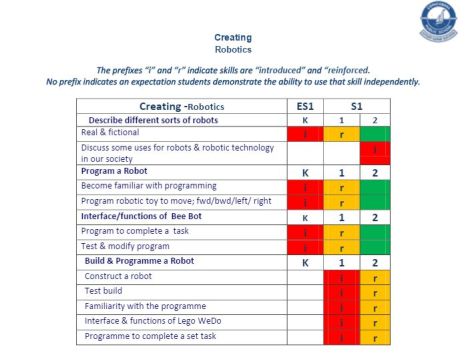
Creating robotics2

Screenshot from Glenys Goffett’s  I.C.T. document.


After recording the tables of information I sat down to work my way through the Western Australian Digital Technology Curriculum Scope & Sequence. I focused on K-6 and slowly attempted to match  each skill to each strand and content descriptor. Below is what I came up with. At this point I have only looked at Coding, Robotics and iPad use. It may not be perfect but it’s a start and will help guide you in what to teach and assess across the ECE and Primary years.

My DT 2016 S&S Plan PDF     DT 2016 K-6 Plan 1

My DT 2016 S&S Plan WORD Doc.   DT 2016 K-6 Plan 1

Please share…Do you have a plan to share? A useful link? Let me know of any useful resources which may help others further their knowledge of teaching and learning DT.

 

First biscitmx.com blog post!

Welcome everyone to the biscitmx.com blog. At this stage what I hope to do is post a weekly blog, why only weekly? Well, like most of you I am busy working. At the moment I am working four and a half days, teaching Yr.1-10, so life is a little crazy. I am learning new skills across a range of subject areas, including furthering my Digital Technologies knowledge. This semester I am currently teaching coding to Yr. 1/2, Yr. 5/6, Yr. 7/8 and Yr. 9/10.

Last semester I focused on using OZOBOT robots and learning how to code by colour and block coding. We coded with textas and paper, iPads and computers. My Yr. 9/10 class explored augmented reality and how we can use it in a real world environment.

This semester some classes are learning about robots and are coding with the OZOBOT for the first time. My Yr. 7/8 class are beginning the journey in using and creating with script code. We are using Microsoft Small Basic, a very simple start that is user friendly with a series of lessons available online to help get them started. I like Small Basic because it is FREE, always a bonus, and because of its simplicity. I didn’t want to scare students off with complex script writing. We have also been looking at the history of gaming and gaming consoles. Students are playing and writing reports on a game (pre 1999). It has been fun with me having serious flashbacks to my childhood…Pong anyone? The students have had previous experience block coding and creating games with Scratch. As we become more familiar with Small Basic script coding we will create our own retro style game.

On my learning agenda is 3D printing. I hope to teach myself Tinker cad and get our newly purchased 3D printer up and running. My first project is looking at printing ‘print blocks’ to use in both my Textiles and Graphic Design classes. I am hoping that this may reduce the time frame required when creating lino print blocks, and perhaps the quality of the prints onto fabric or paper. I will let you know how it goes. Any advice would be very appreciated, so please do share what you have tried, what worked or what didn’t.